 |
||||||||||||||||||||||
| Deakkus.com > Austauschakku › Austauschakku für MSI Laptop Akkus › Austauschakku für 0016Q3-075 | ||||||||||||||||||||||
|
||||||||||||||||||||||
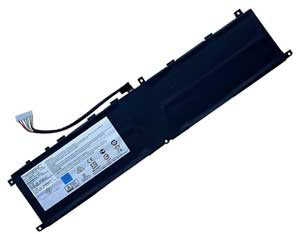 Für eine grössere Darstellung klicken Sie auf das Bild. Abbildung ähnlich Preis: € 49.90 inkl. MwSt. |
||||||||||||||||||||||
Produktbeschreibung |
||||||||||||||||||||||
|
||||||||||||||||||||||
Dieser Laptop Akku kann die folgenden Teilenummern ersetzen: MSI BTY-M6L, Dieser Laptop Akku ist auch mit folgenden Modellen kompatibel: MSI 0016Q3-012, GS65 8RF, GS65 8RF-408, P65 8RD, P65 8RF-451 - Creator, PS42 8RB-073, 0016Q2-408, GS65 8RE-020, GS65 8RF-020DE, GS65 Stealth Thin 9RE-051US, P65 8RE-075, PS42 8RB-032, PS63 Modern 8RC-010CN, 0016Q2-020, GS65, GS65 8RF-019DE, GS65 Stealth Thin 8RF, P65 8RE, P65 Creator 8RF, PS63 8RC, 0016Q3-010, GS65 8RE-079, GS65 8RF-078 Stealth Thin, MS-16Q3, P65 8RF-451, PS42 8RB-059, 0016Q2-079, GS65 8RE-014CN, GS65 8RF-020, GS65 Stealth Thin 8SG, P65 8RE-010DE, PS42 8RB-022TW, PS63 Modern 8RC, 0016Q2-019, 0016Q3-075, GS65 8RF Stealth Thin, GS65 Stealth Thin 8RE-051US, P65 8RD-012, P65 Creator, PS63, 0016Q3-008, GS65 8RE-020DE, GS65 8RF-078, MS-16Q2, P65 8RF, PS42 8RB-038, Stealth Thin GS65, 0016Q2-078, GS65 8RE, GS65 8RF-019DE Stealth Thin, GS65 Stealth Thin 8RF-012CN, P65 8RE-008, PS42 8RB, PS63 Modern, |
||||||||||||||||||||||
| Bevor Sie ein Ladegerät für Ihren Laptop kaufen, müssen Sie sicherstellen, dass es die korrekte Ausgangsspannung und Stromstärke liefert. 1. Kompatibilität prüfen Vergleichen Sie Spannung und Stromstärke (z.B. 19V; 4,74A) auf dem Typenschild des Ladegeräts oder der Laptop-Unterseite. 2. Anschlusstyp bestätigen. |
||||||||||||||||||||||
| Disclaimer: Deakkus.com is an independent retailer and is not affiliated with, authorized by, or endorsed by the manufacturers of laptops or accessories referenced on this site. All trademarks and brand names are used for product compatibility purposes only. Our products are designed to meet industry standards but are not original manufacturer parts. Product specifications are based on independent testing. Customers are advised to verify compatibility before purchase. | ||||||||||||||||||||||
| Terms and Conditions
Payment and Shipping Warranty Return Refund Policy About Us Contact Us Copyright © 2025 Deakkus.com All Rights Reserved. E-mail: order@deakkus.com |